Software engineer
in the making.
C++, Python, and the road to FAANG.
I'm 37. Two years ago I committed to learning to build software. This site is a workbook — what I'm shipping, what I'm reading, the dead ends I walked into this week. No flourish. A bit about how I got here.

Eddie Donalds
I spent over fifteen years working in an enterprise Department of War environment in the Middle East. Big responsibility, supporting critical infrastructure that lives depended on. I started on backbone networking, firewalls, and proxies (Bluecoat was the death of me), and along the way picked up additional duties as Security Operations (SecOps) chief. Eventually I moved into Systems Engineering — engineering virtualized storage infrastructure and enterprise storage solutions on NetApp. From there I was promoted to chief of systems operations within Southwest Asia. Every day was a circus. I was always on go.
Two years ago I started teaching myself to code on my days off. C first, because someone on a forum said it would hurt and they were right. Then C++, because I wanted to understand what was happening underneath. Python because I needed to ship something.
I consider myself an expert in local LLMs and using AI to ship things. Everything still requires careful steps to make sure what gets deployed actually works.
With the ubiquity of AI, AI agents, and everything around them, the delivery of code is a massive leap from what it was before.
Stack
- C++ 20primary
- Python 3.12tools
- VMware and NetAppstorage
- VS Codeeditor
- Linux (Red Hat)os
- Git, make, gdbdaily
working on 3 projects at the same time. been studying c++. it’s like i’m shooting myself in the foot. i dont know if this is beneficial, but at least it’s giving me something to do. exercism.org is a great site to practice by the way.
Things I'm building.
Small, finished things over big, half-done things. Repos linked where they're readable.
Unswipe
Tracks screen time on the apps that own your day. Asks a small, polite question every time you reach for one — "Do you really want to open Facebook?" — before letting you in.
Kobva
reserved. working on shipping these.
SunStreak
reserved. working on shipping these.
Say hi.
I read everything. I reply to most things, eventually.
What I'm open to
- Internships and junior roles in C++ or Python (US, remote-friendly).
- Pair programming with anyone working through similar material.
- Mock interviews. I'll do them all day.
- Honest feedback on the projects above, especially if it stings.
I Am Alive
A personal-safety check-in app. A dead-man's switch with a friendlier UI.
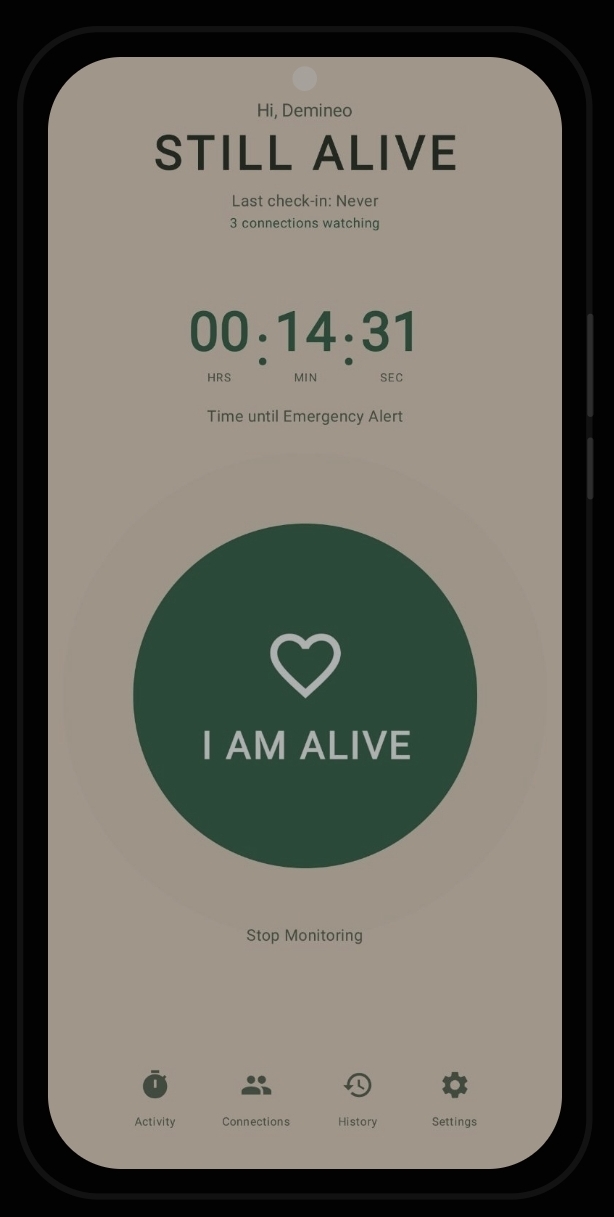
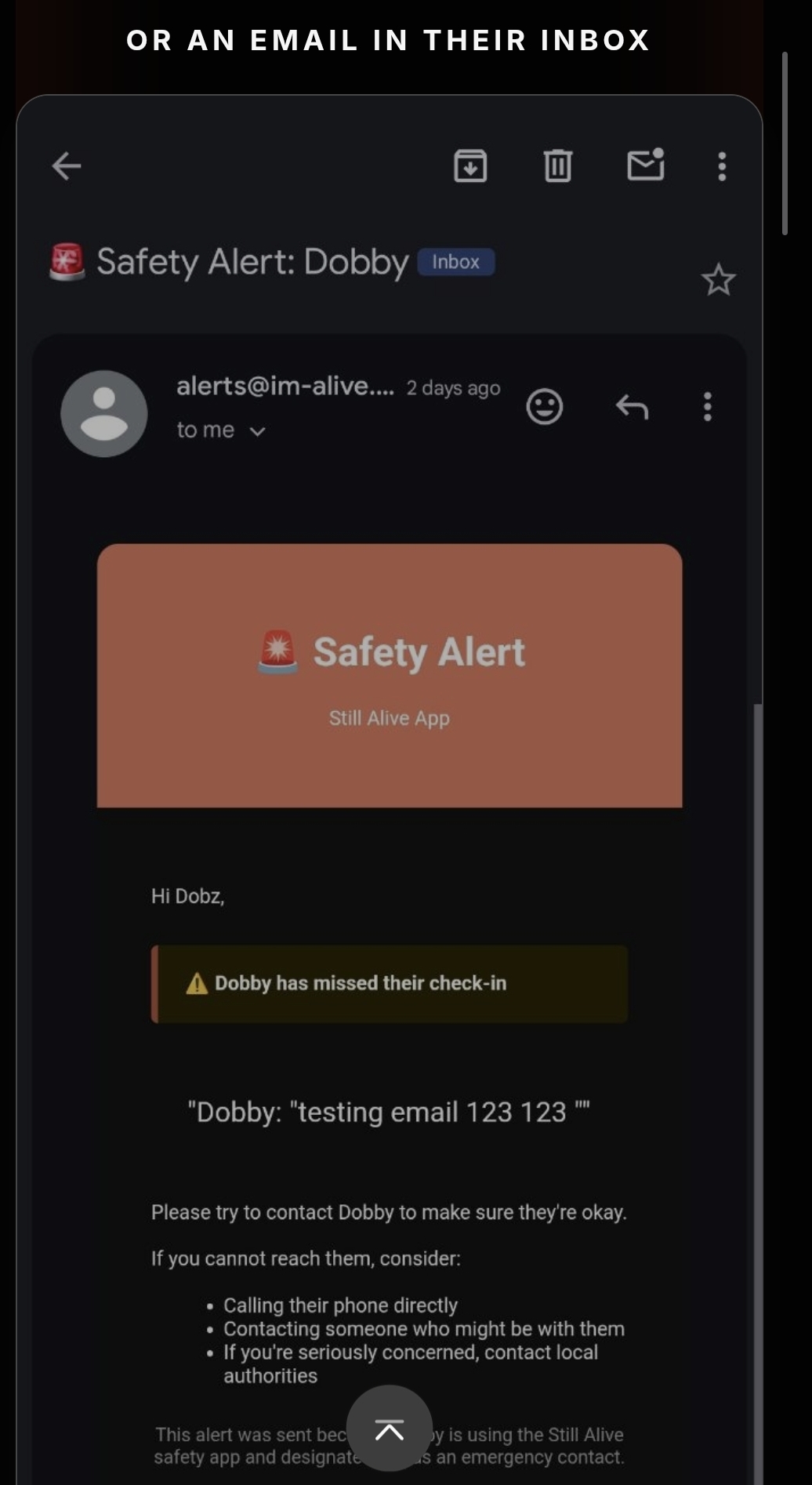
Live now at im-alive.net — shipped, real, and running the full push / email / SMS alert pipeline. Not a demo.
What it is
A personal-safety app for situations where you want someone to know if you don’t make it home. You start a monitoring window before a run, a late shift, a date, a hike, a flight. The app counts down. You tap I AM ALIVE to confirm you’re okay before the timer runs out.
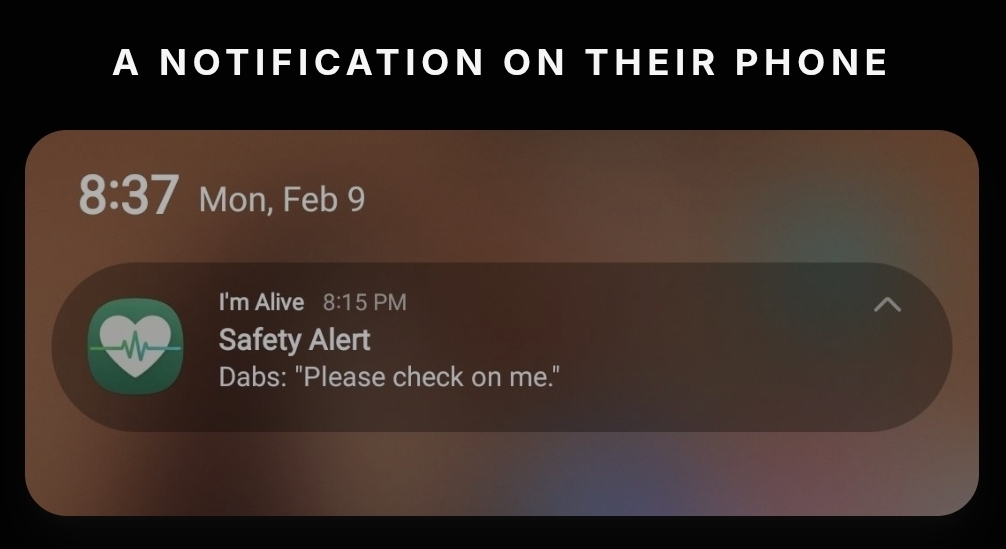
If you don’t, your safety network — the people you’ve added as connections — gets an automatic alert across push, email, and SMS. No fumbling for a phone in an emergency. The check-in is the action; missing it is the signal.
It’s a dead-man’s switch, made gentle.
How it works
- Start a session. Pick a duration (free tier: 1 hour minimum; premium: 15 minutes). The app begins counting down.
- Check in. A single tap on the heart-shaped I AM ALIVE button resets the timer or ends the session. A breathing-glow animation makes it obvious the app is alive even when you’re glancing at it under stress.
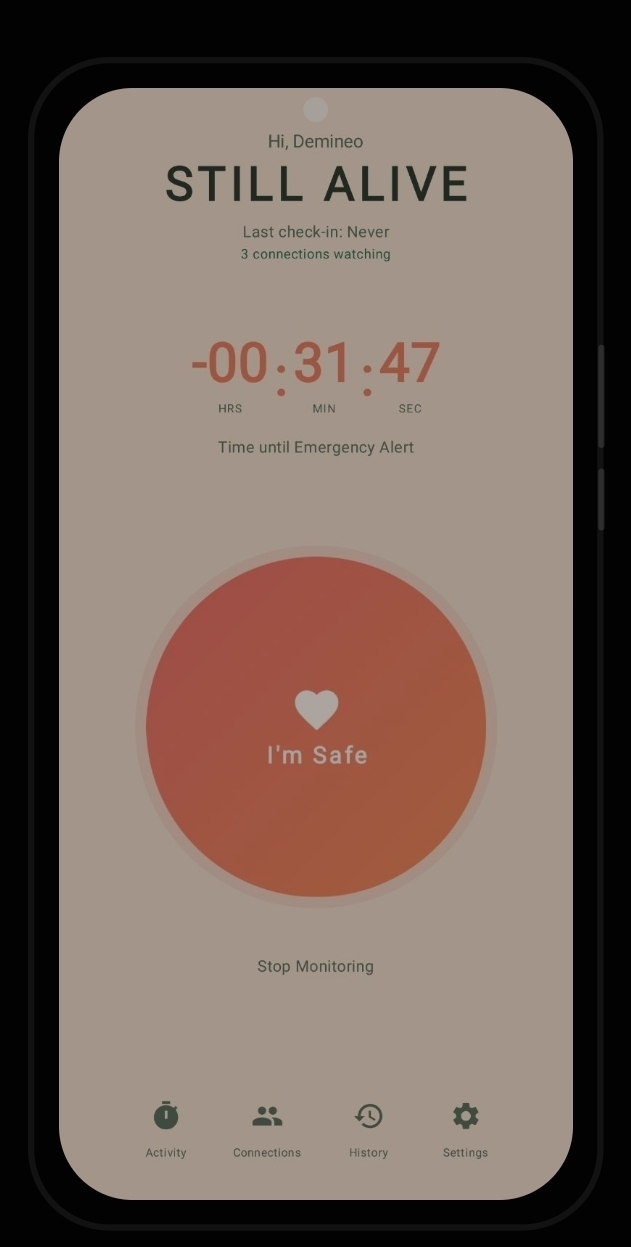
- Miss the window. The timer goes negative, the button shifts to a warning gradient, and the alert pipeline fires. Connections receive a push notification immediately, an email (premium), and the user can also send SMS via a Play-Store-compliant intent.
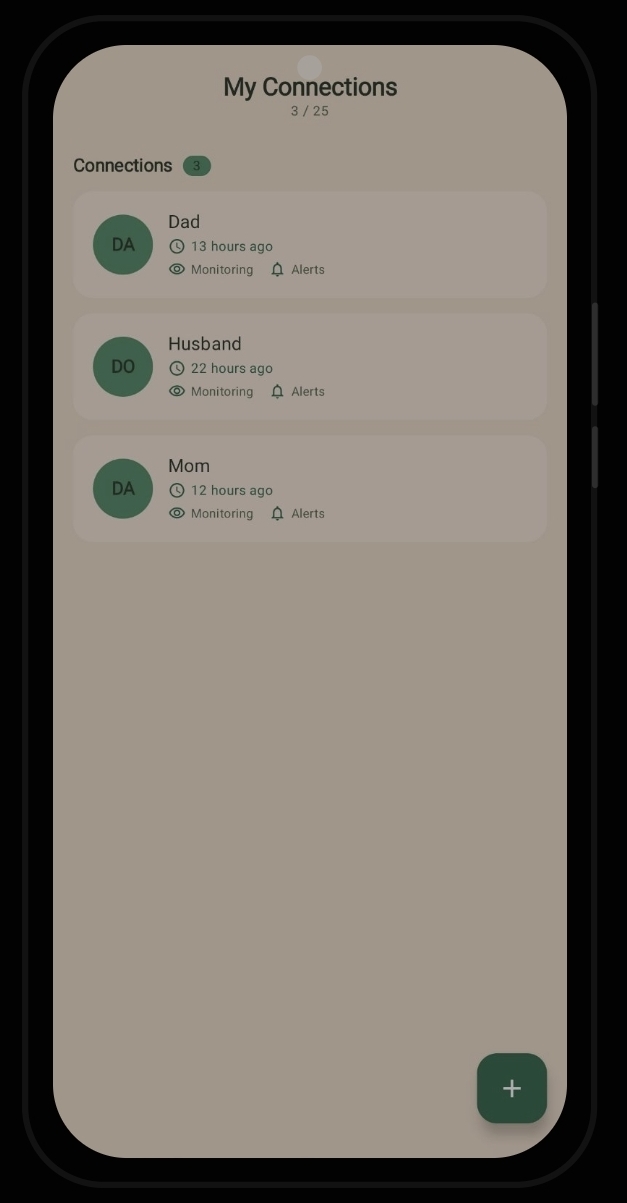
- Build a network. Connections are people you trust to act if something’s wrong. Free tier supports 3; premium supports 25. The home screen shows how many connections are watching the active session.
- Social Safety Timer. Premium adds a one-shot GPS ping that embeds your location as a Maps URL into the alert message — useful for hikes, runs, late commutes.
How the code works
The hard problem here is reliability: a deadline must fire even with the app backgrounded, the phone in doze mode, or the battery saver active. The app doesn’t bet on any one mechanism — it stacks them.
- Two-layer scheduling.
AlarmManagerschedules the exact deadline, andWorkManagerprovides a recovery backup so a missed alarm gets caught the next time the app or worker wakes. Combined, the two cover most OS-level edge cases. - Server-side safety net via
pg_cron. A Supabase Edge Function calledcheck-deadlinesruns every minute as a scheduled Postgres cron job. It scans for users whose check-in deadline has passed and triggers alerts server-side — so even if the phone is off, dead, or out of network, the backend still notices and notifies. - Throttled fan-out. When
check-deadlinesfinds an overdue user, the alert pipeline pushes through three channels: FCM for immediate notifications to every connection, Resend for email (premium, fromalerts@im-alive.net), and intent-based SMS that opens the user’s messaging app pre-populated (noSEND_SMSpermission required, which keeps the Play Store review easy). A 15-minute cooldown between repeat alerts prevents notification floods. - Durable state, not in-memory flags. Active sessions, the activity timer, the user’s custom alert message — all persisted in
DataStoreandRoom. Reopen the app after a kill and the session rehydrates. Restarting the phone doesn’t lose the deadline. - Clean Architecture, MVVM, Hilt. Presentation / Domain / Data / Core layers, dependency injection via Hilt. The UI binds to a state machine (
idle → armed → expiring → overdue → alerting) so visual transitions like the heart-button color shift are state-driven, not flag-driven. - Auth via Supabase + Google OAuth. Credential Manager API on the device, IDToken handoff to Supabase. Users can sign in with email or one tap with Google.
- Heartbeat on app launch. Every cold start pings the backend, so if a user uninstalls and someone monitoring them never sees a heartbeat, the system can flag a stale account.
What’s interesting about it
For coders, hiring managers, and FAANG recruiters specifically:
- It’s shipped and live. im-alive.net is real, the app is ~97% release-ready for the Play Store, the domain is verified for transactional email. That’s a different signal from a tutorial-shaped repo.
- Reliability engineering on a phone. Two-layer client scheduling (
AlarmManager+WorkManager) plus server-sidepg_cronreconciliation is exactly the right answer for “what if any single layer fails?” It’s the kind of belt-and-suspenders thinking interviewers look for in distributed-systems questions, applied to a real consumer product. - Intent-based SMS. Avoiding the
SEND_SMSpermission to stay on the Play Store’s good side is a small but mature decision — it shows awareness of platform policy, not just shipping the easiest path. - Throttling and back-pressure. A 15-minute cooldown between repeat alerts keeps the system from saturating connections. These are the details that separate a class project from a product.
- End-to-end ownership. Compose UI, Hilt-wired domain layer, Room + DataStore for local state, Supabase + pg_cron for backend, FCM for push, Resend for email, Google OAuth for auth, GitHub Pages for the privacy policy. Not a slice — the full vertical, including the bits that aren’t fun.
- Designing for an emergency UX. The breathing glow on the check-in button, the deliberate color shift in the overdue state, the giant tap target, the “Stop Monitoring” link sized below the action — these are choices for a product where the user might be panicked, frozen, or distracted. Most apps don’t have to think this hard about their primary action.
- A product with a clear failure mode. Hiring conversations love this question: “how do you know it works?” The answer here involves observability on the alert pipeline, the dual-scheduler design, contract tests on the deadline checker, and a way to fire-drill the whole flow without scaring anyone.
Unswipe
An Android app that puts a speed bump between you and the doomscroll.
What it is
A digital-wellbeing app for the apps that took over your phone — TikTok, Instagram, YouTube, Facebook, the usual suspects. Unswipe doesn’t block them. It doesn’t shame you. It just adds a small, polite question at the moment you reach for them, the moment when reflex usually wins over intention.
The bet is small-scale: a one-tap confirmation, every time, is enough friction to break the spell on most of the openings that didn’t really need to happen.
How it works
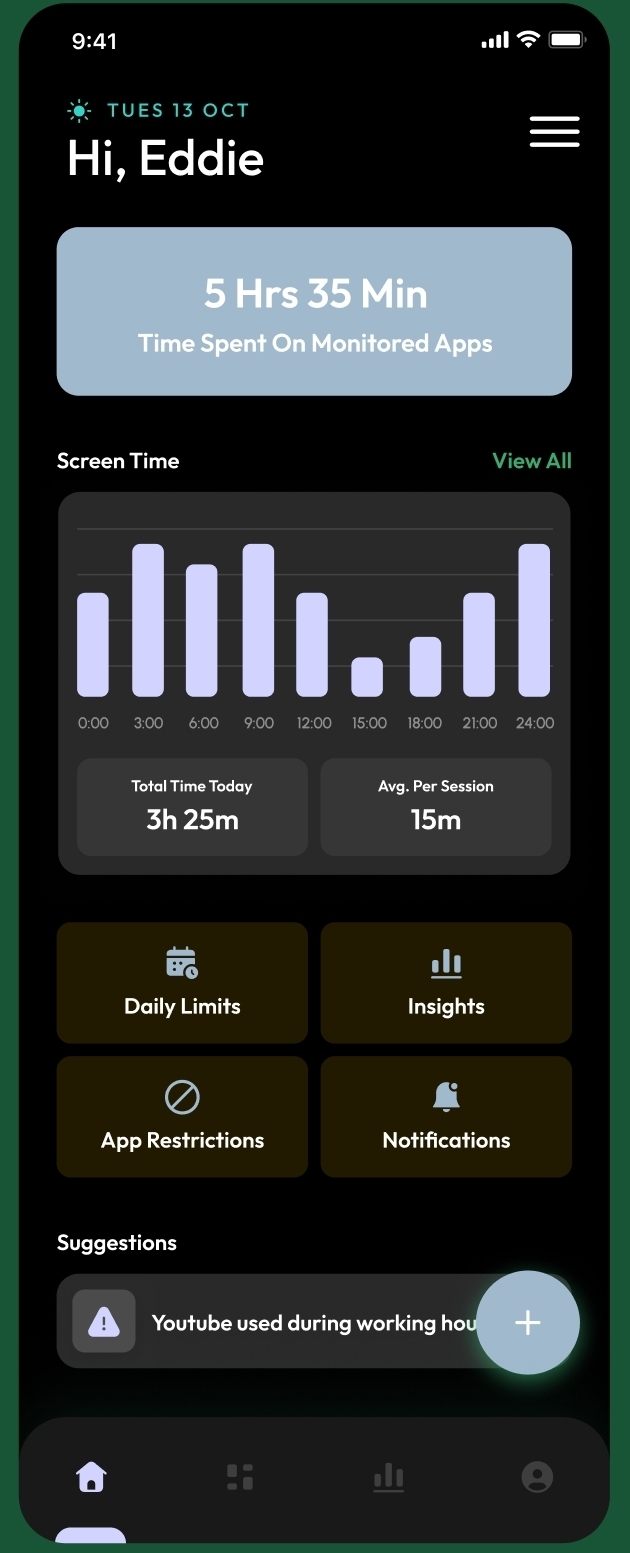
The dashboard does the boring-but-honest thing first: shows you how much time you actually spent on monitored apps today, broken down across the day in a chart you can’t ignore. Below that, four tiles for the things you might want to act on — Daily Limits, Insights, App Restrictions, Notifications. A “Suggestions” card surfaces patterns the app noticed (“YouTube used during working hours”).
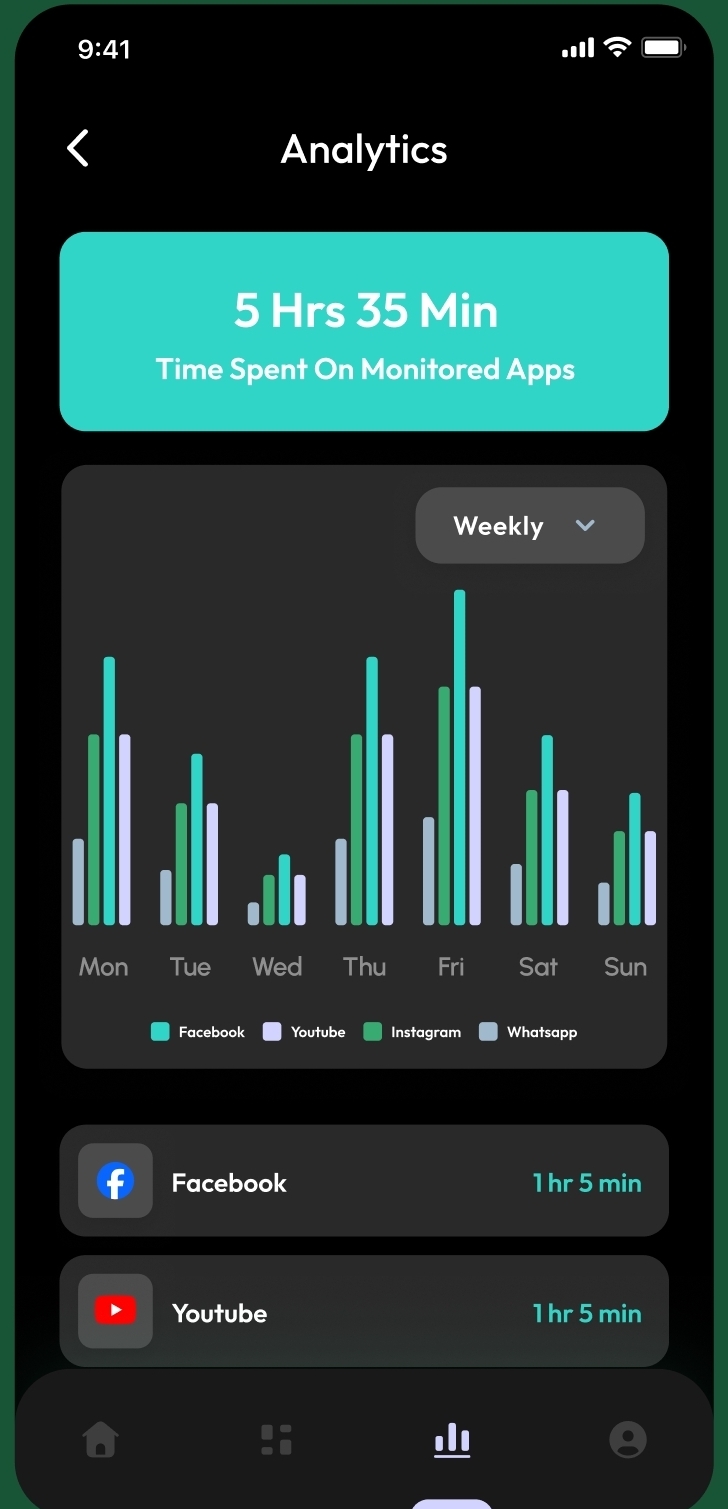
The Analytics tab goes deeper: a weekly view stacked per app, so you can see whether Tuesday is your Facebook day or Friday is your Instagram night. Each app gets a row with the total time spent.
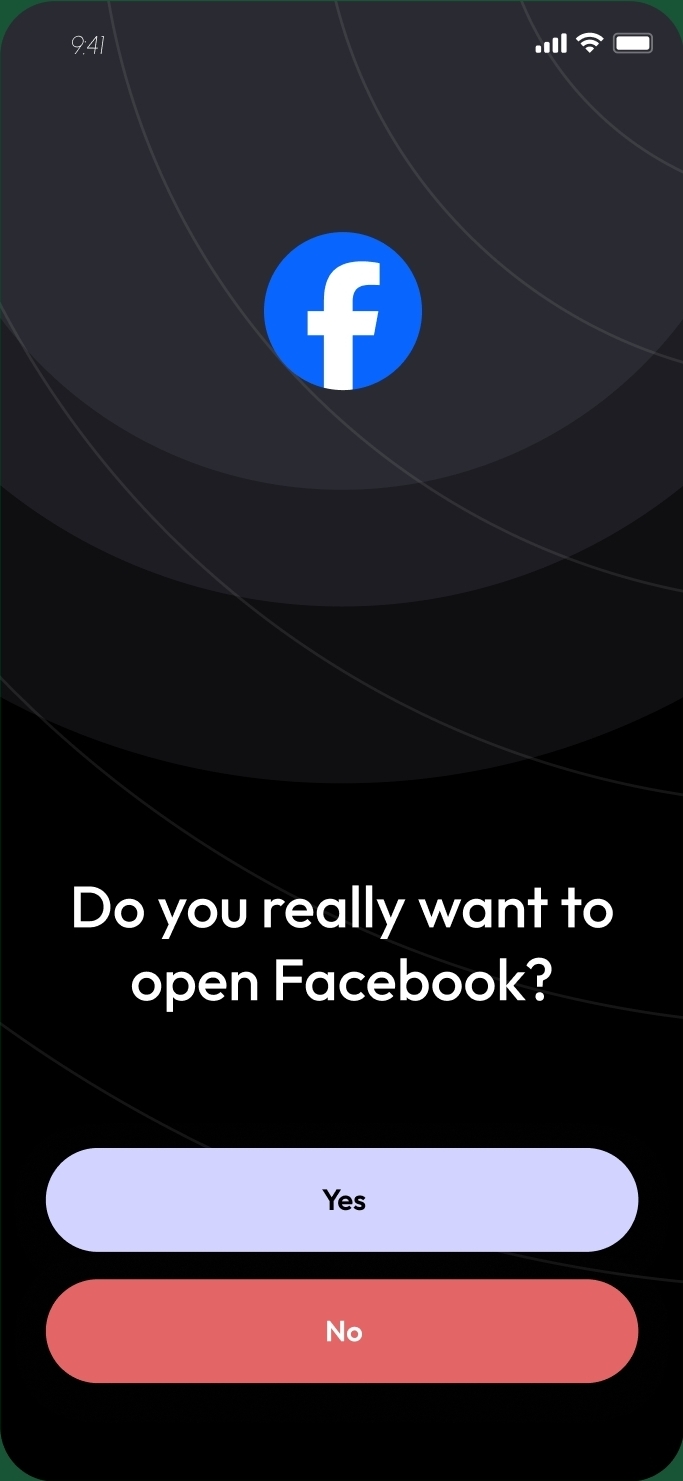
And then there’s the actual intervention: when you tap a monitored app, instead of opening it, Unswipe surfaces a full-screen dialog — “Do you really want to open Facebook?” — with two buttons: Yes and No. That’s it. No lecture, no streak, no shame. The friction itself is the feature.
Free tier covers tracking, the dashboard, and the friction dialog. Premium adds custom time limits per app, longer history, user-defined blocklists, and Firestore cloud backup.
How the code works
Unswipe is unusual among consumer apps in that its core feature requires two of Android’s most sensitive permissions — usage stats and accessibility — and shipping that to the Play Store cleanly is most of the engineering challenge.
UsageStatsManagerfor the data layer. Screen time, per-app session counts, and unlock counts come fromUsageStatsManager, which requires a special permission grant (the user toggles it manually in system Settings — there’s no runtime prompt for it). The app aggregates these into daily and weekly buckets and stores them in Room. AWorkManagerperiodic job re-aggregates so the dashboard is fast.- An
AccessibilityServicefor the friction dialog. The “Do you really want to open Facebook?” screen is the hard part. The app listens viaAccessibilityServicefor the moment a monitored app’s package comes to the foreground, intercepts the launch, and overlays its own confirmation Activity. Done wrong, this is invasive; done right, it feels native. Accessibility services are also one of the most-scrutinized permissions on the Play Store — the listing has to justify the use precisely, and you have to honor it (no analytics phone-home, no ad SDKs, no scope creep). - Clean Architecture, MVVM, Hilt + KSP. Presentation / Domain / Data layers, compile-time DI via Hilt, all annotation processing on KSP (no KAPT — faster, more modern). Room is also wired through KSP.
- Firebase as the backend. Firebase Auth for accounts, Firestore for premium cloud backup of the user’s history and settings. The free tier never touches the network for tracking — that all stays local.
- Play Billing for premium. Subscriptions through
BillingClient, with the local subscription state mirrored in DataStore and the canonical state living server-side (so a re-install picks up an active sub). - Compose all the way down. UI is 100% Jetpack Compose with Material 3. Charts (the weekly bars on Analytics, the time-of-day bars on the dashboard) are hand-rendered Compose, no third-party charting library.
What’s interesting about it
For coders, hiring managers, and FAANG recruiters specifically:
- Two of the trickiest permissions on Android, used responsibly. Usage stats and accessibility services are red flags on a Play Store review queue when used carelessly — and most consumer apps shouldn’t touch them at all. Unswipe needs both, by design, and getting that approved means writing a tight permission justification, keeping the feature scope small, and not bolting on anything the permission could enable but the user didn’t sign up for. That’s a hard line to walk; few junior portfolios show evidence of having walked it.
- A product thesis with a real opinion. “Block all the bad apps” is the easy answer; a lot of digital-wellbeing apps default to it. Unswipe’s answer is gentler and more interesting: behavior change works better when the user keeps agency. A confirmation isn’t an obstacle; it’s a moment of intention. That’s a product call, and it shapes every feature. Hiring managers notice when a project has a viewpoint, not just a feature list.
- A modern Android stack, consistently applied. Compose-only UI, Hilt+KSP (the right modern DI choice), Room+DataStore for local state, Firebase Auth/Firestore for cloud, WorkManager for background, Play Billing for monetization. No dead code paths from old approaches; no half-migration. The choices are coherent.
- Honest engineering on the boring parts. The screen-time math is fiddlier than it looks (overlapping sessions, rolling-window aggregation, cold-day defaults). The friction dialog has to be fast — slower than 200ms and it feels broken. The analytics charts look simple, but they’re hand-drawn in Compose for layout flexibility on small screens. None of this is glamorous; all of it is what separates a finished app from a tutorial.
- A clear monetization story. Free tier is fully functional — you can track, you can get the friction dialog, you can see your dashboard. Premium adds depth (custom limits, history, blocklists, cloud sync). That’s the right shape for this kind of utility app — and it shows the developer thought about the business model, not just the screens.
Umbra
A World of Warcraft addon that puts a Mythic+ performance grade on every player you see.
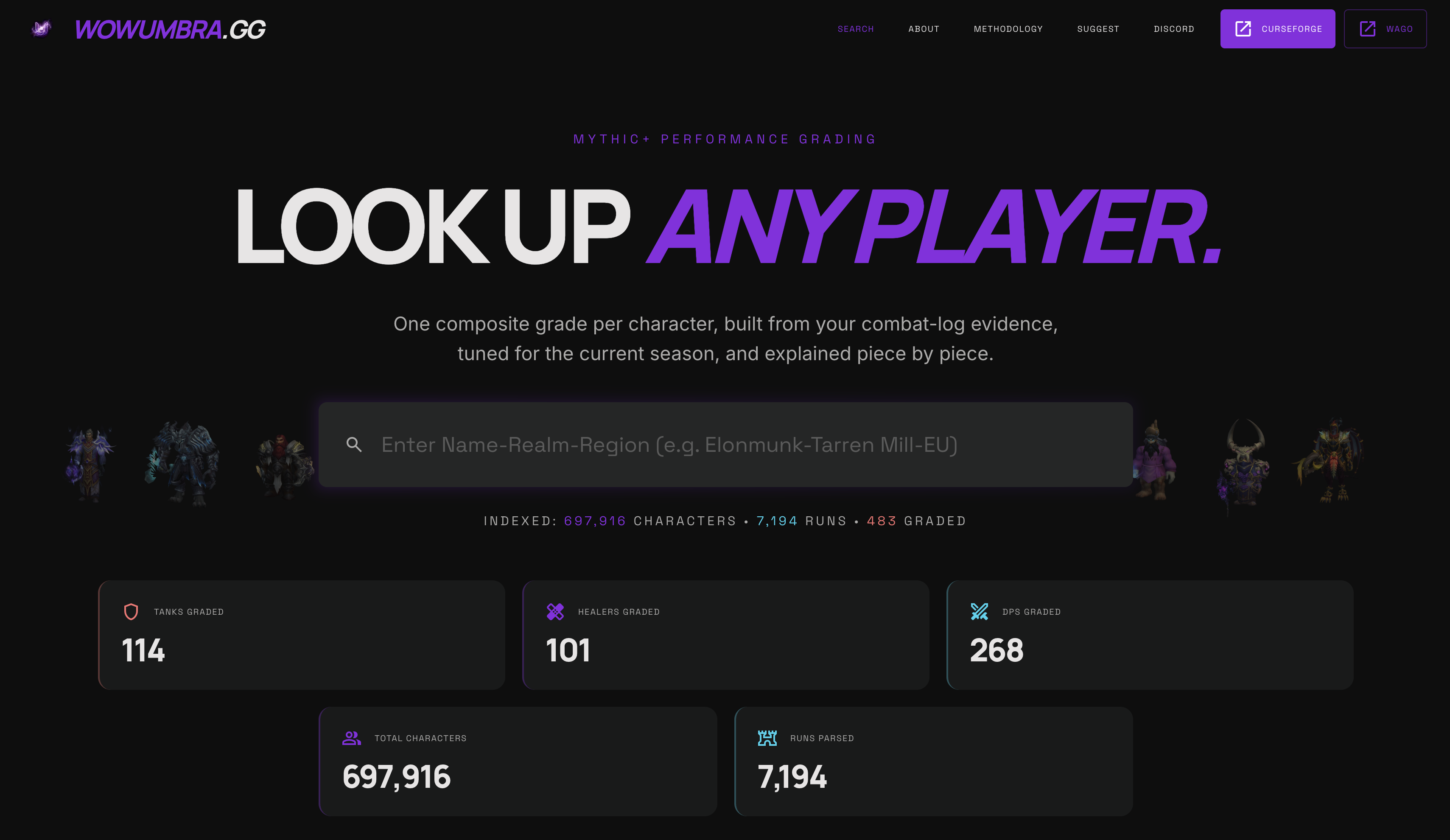
Live now at wowumbra.gg — 1,300+ CurseForge installs, ~700K characters graded from real combat-log evidence.
What it is
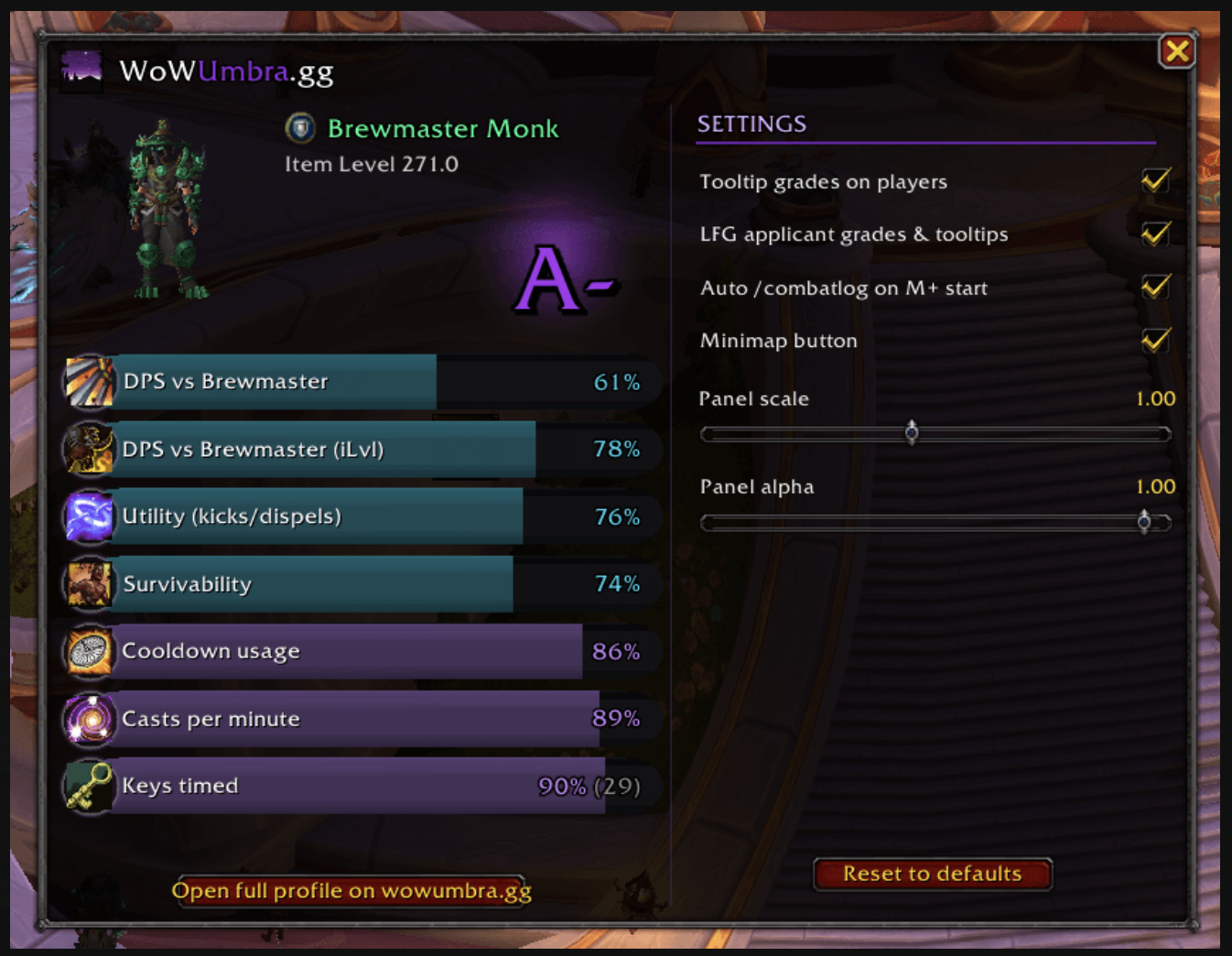
A companion addon for World of Warcraft that surfaces composite Mythic+ performance grades on the players you encounter — in tooltips, in the Group Finder, on party frames. The grades aren’t reputation or vibe; they’re computed from real combat-log evidence per character, per role, for the current season, by the companion site wowumbra.gg. The addon is the in-game eyes of that grading system: it brings the data to the moment of decision, so you can size up a key or a pug invite at a glance instead of alt-tabbing to a website.
Released on CurseForge, 1,300+ downloads in the first weeks.
How it works
The grading happens server-side at wowumbra.gg, which indexes characters from public combat logs and assigns each one a composite letter grade per role (DPS, Tank, Healer) backed by per-metric subscores: damage in role, healing in role, cooldown usage, kicks/utility, survivability, casts per minute, keys timed. The site already had ~700K characters indexed and ~7K runs parsed at launch.
The addon plugs that data into the parts of the game where you actually care:
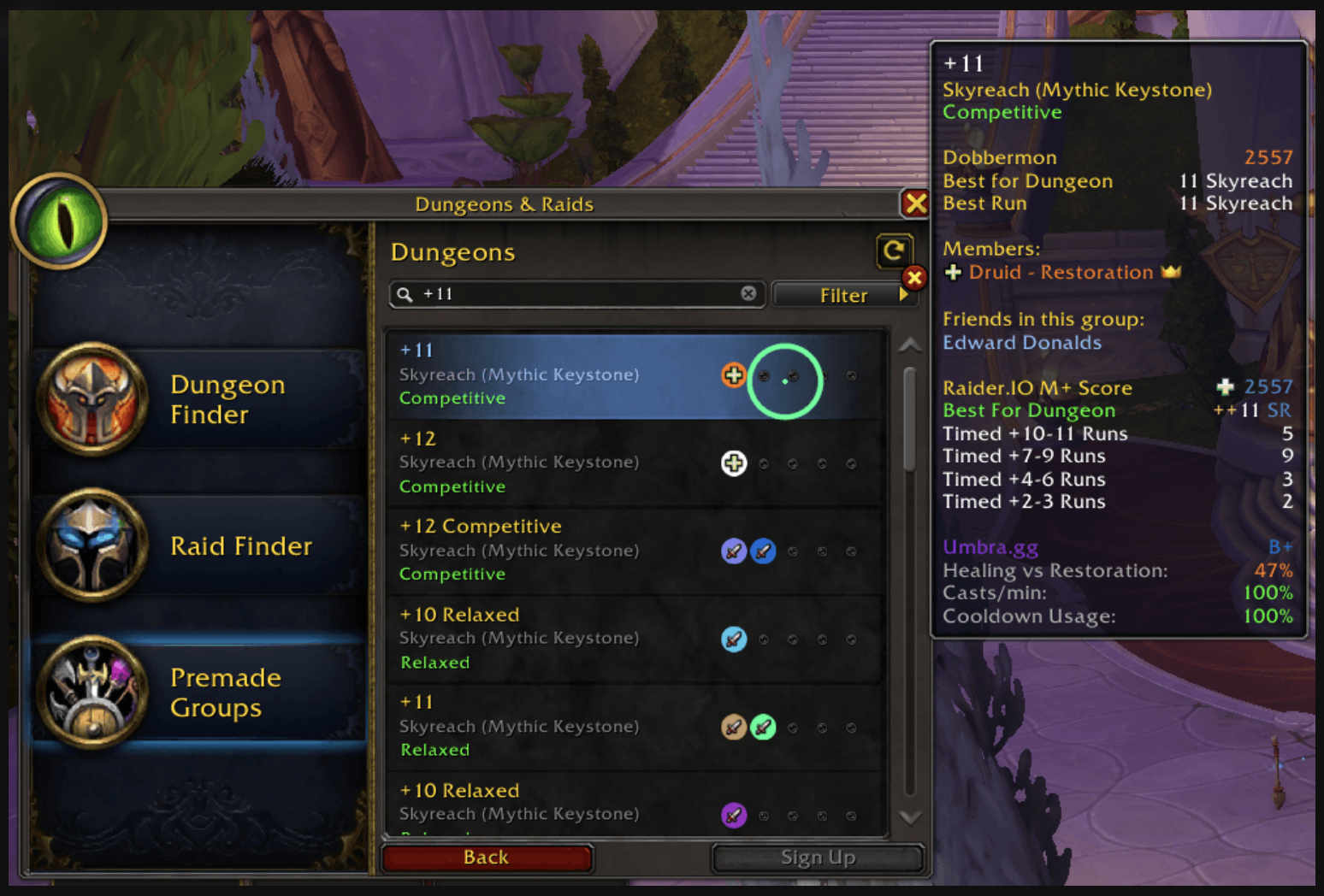
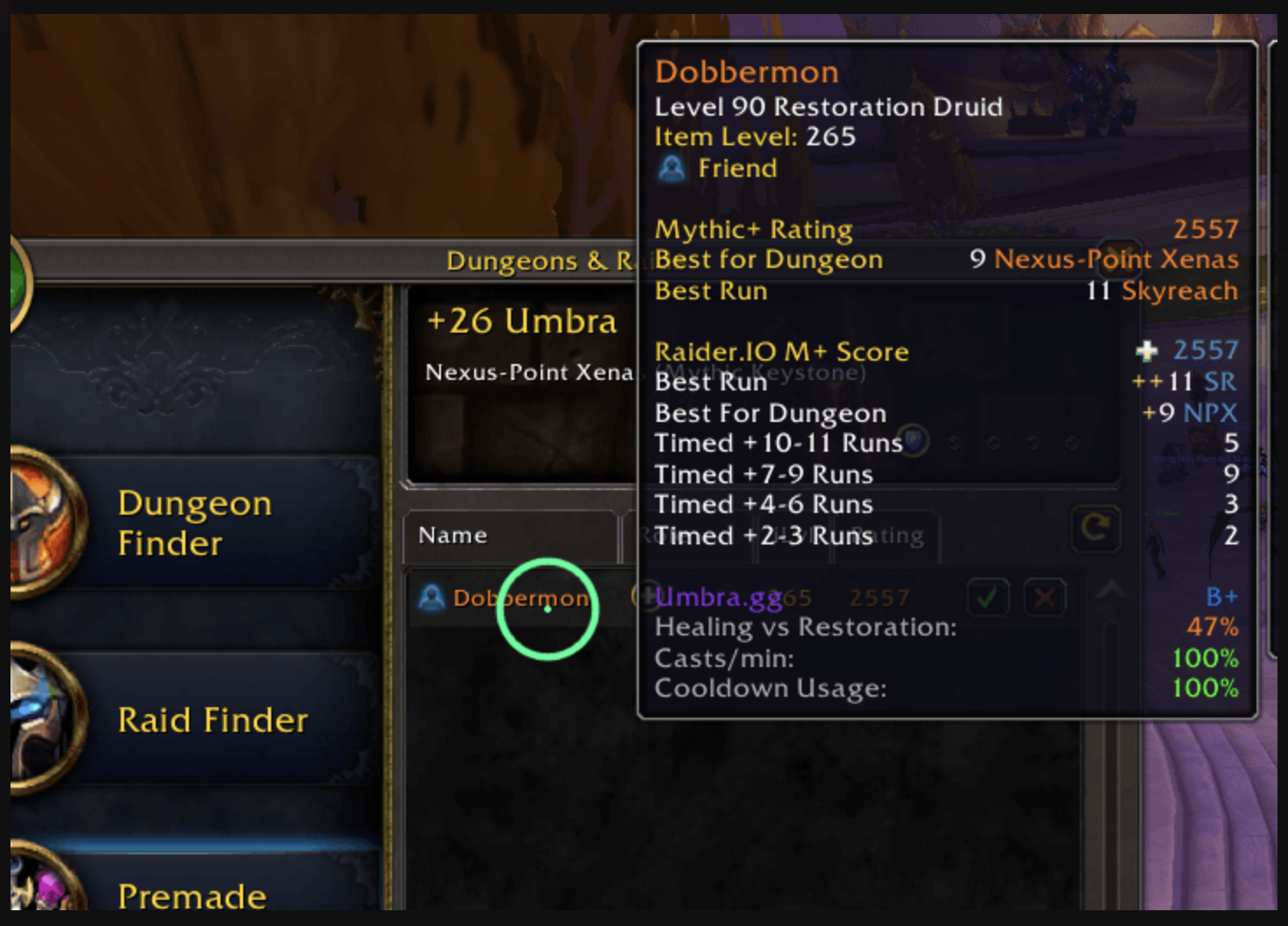
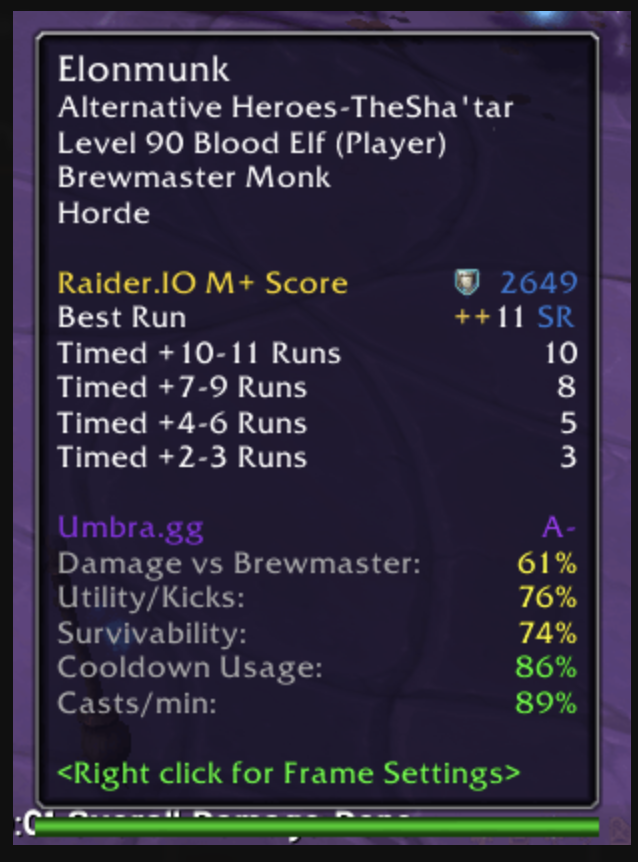
- Player tooltips. Hover anyone — guildmate, pug applicant, summon target — and Umbra appends a Mythic+ panel showing best run, best dungeon, role grade, and metric breakdown.
- Group Finder integration. Open Premade Groups and applicant grades render right beside the rows. No more inviting a tank with a +6 best key into your +18.
- Party / raid frames. Inline grades next to your group’s frames, so you can read your group’s collective shape during the dungeon, not just before.
- Auto-
/combatlog. Optional: starts logging automatically the moment a Mythic+ key begins, so the next run from your group’s perspective gets indexed too. - Settings panel. Toggle anything — tooltip integration, LFG integration, frame rendering, panel scale and opacity, minimap button — without touching slash commands.
How the code works
WoW addons live in an unusual environment: Lua running inside Blizzard’s sandboxed addon API, with no arbitrary network access, a small surface for UI (frames, tooltips, fontstrings), and a strict performance budget. Anything that runs inside a tooltip render or an LFG list refresh fires dozens of times a second — sloppy code is felt instantly as input lag in the game.
- Lua + WoW Addon API throughout. The addon hooks Blizzard’s existing UI —
GameTooltip,PVEFrame, party / raid unit frames — rather than rebuilding it. Listening to events likeUPDATE_MOUSEOVER_UNIT,LFG_LIST_*, andGROUP_ROSTER_UPDATEis what triggers grade rendering at the right moment. SavedVariablesfor persistence. Settings, user preferences, and any local caches live in WoW’sSavedVariablestable — a Lua table the client writes to disk on logout and reads back on login.- Companion grading service at wowumbra.gg. WoW addons can’t make arbitrary HTTP requests, so the heavy lifting — combat-log parsing, season-normalized scoring, composite letter grades — runs on the wowumbra.gg backend. The site indexes characters from public logs and stores grades per-character, per-role; full reports live on the web. The addon’s role is to surface what it can in-game and link out to the full breakdown when needed.
- Performance discipline. Hot paths are everywhere: a tooltip listener that allocates on every frame, a list-refresh handler that does a linear scan over hundreds of applicants — these are how addons accidentally tank framerate. The addon batches, debounces, and short-circuits fast on cache hits to stay invisible to the player.
- Settings as first-class UX. Every behavior — tooltip integration, LFG integration, frame rendering, the auto-
/combatlogtoggle, panel scale and alpha — is exposed through a Blizzard-styled settings panel rather than slash commands. WoW power users tolerate slash commands; everyone else needs a checkbox.
What’s interesting about it
For coders, hiring managers, and FAANG recruiters specifically:
- Real users, not a tutorial. 1,300+ downloads on CurseForge in the first weeks. That’s a different signal from a
hello-worldportfolio repo — people installed it, used it, kept it. - Two systems in one product. A grading engine that ingests combat logs, normalizes them, and produces per-metric and composite scores at scale (~700K characters indexed) — and a client addon that surfaces those scores at the moment of decision in-game. The two halves talk through a thin contract; each one is interesting on its own merits.
- Hard performance constraints. WoW’s addon environment is unforgiving. UI hooks fire at frame rate, memory budgets are tight, and a poorly written hot path is felt by the user as input lag. Shipping an addon that is quiet — that you don’t notice when it’s running — requires real attention to debouncing, caching, and event triage.
- An unusual stack, learned end to end. Lua + the WoW Addon API isn’t a stack you pick up by following a course. There’s documentation, but most of the knowledge lives in source code of other addons and a few wikis. Shipping something that 1,000+ players use in a niche, technical stack proves you can drop into an unfamiliar ecosystem and produce.
- A product with a clear judgement layer. Grading players is opinionated by definition — every weight, every normalization, every cutoff is a call. Defending those choices to a community that will push back is its own skill, distinct from writing the code.
- Free, polished, and shipped. No paywall, no nag screens, no scope creep. The product does one thing well and respects the user’s time.
Kobva
reserved. working on shipping these.
SunStreak
reserved. working on shipping these.